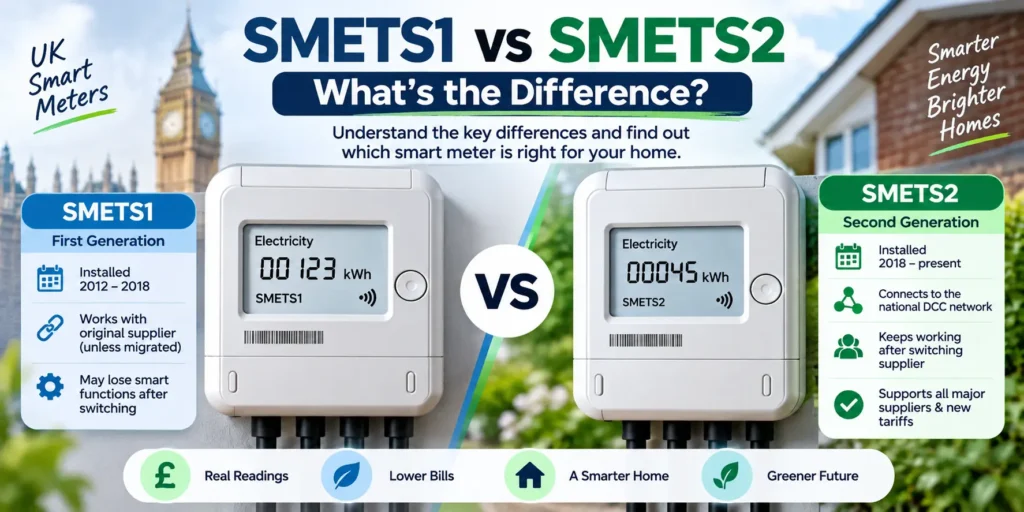
If you have a smart meter in your UK home, it’s almost certainly running on one of two technical standards: SMETS1 or SMETS2. The difference sounds technical, but it has real consequences — from whether your meter keeps working properly after you switch energy supplier, to whether you can access the cheapest smart tariffs on the market. This guide breaks down everything you need to know.
What Are SMETS1 and SMETS2 Smart Meters?
SMETS stands for Smart Metering Equipment Technical Specifications — the UK government standard that dictates how smart meters must operate and communicate. Every smart meter installed in Great Britain has to meet one of these two versions of the specification, and which one you have affects how reliably your meter behaves once you change supplier or want to access smart features.
What Is a SMETS1 Smart Meter?
SMETS1 was the first generation of smart meters, installed in UK homes roughly between 2012 and 2018. These meters were built to communicate with the supplier that installed them, typically over a single mobile network. That worked fine as long as you stayed with the same supplier — but if you switched, many SMETS1 meters lost their “smart” functions and reverted to acting like an old-fashioned meter, meaning manual readings and estimated bills.
A large migration programme has since moved many SMETS1 meters onto a shared national network so they behave like SMETS2 meters, but not every SMETS1 meter has been migrated, and some older units still can’t be enrolled at all.
What Is a SMETS2 Smart Meter?
SMETS2 is the current, second-generation standard, rolled out from late 2018 onward and used in every new smart meter installation since. Instead of connecting to an individual supplier’s system, SMETS2 meters connect to a shared national network run by the Data Communications Company (DCC). Because every supplier can read data from that same network, SMETS2 meters keep working in smart mode no matter who you’re with — including straight after a switch.
SMETS1 vs SMETS2: Key Differences
The core distinction between the two standards comes down to how they communicate:
- Network connection: SMETS1 meters typically talk to one supplier’s own back-end system; SMETS2 meters talk to the shared, supplier-agnostic DCC network.
- Behaviour after switching supplier: SMETS1 meters can lose smart functionality when you switch (unless migrated to the DCC); SMETS2 meters are designed to keep working regardless of supplier.
- Rollout period: SMETS1 meters were installed mainly from 2012–2018; SMETS2 meters have been the standard since late 2018.
- Long-term support: SMETS2 is the meter type the industry and government are standardising around, including for future smart tariffs and grid initiatives.
SMETS1 vs SMETS2 Comparison Table
| Feature | SMETS1 | SMETS2 |
| Rollout period | ~2012–2018 | Late 2018–present |
| Network | Individual supplier network | National DCC network |
| Works after switching supplier | Not guaranteed (unless migrated) | Yes, by design |
| In-home display | Usually included | Usually included |
| Compatible with all major suppliers | Not always | Yes |
| Supports newer smart tariffs | Sometimes, if migrated | Yes |
| Free to install/replace | Yes | Yes |
What Is the DCC and Why Does It Matter?
The Data Communications Company (DCC) is the national network that links smart meters to energy suppliers across Great Britain. It’s the piece of infrastructure that makes a smart meter genuinely “supplier neutral.” Once a meter is enrolled on the DCC, any licensed supplier can read its data, which is what keeps automatic readings and smart features working when you switch. All SMETS2 meters are DCC-enrolled by default, and increasing numbers of SMETS1 meters are being migrated onto the DCC too, though that migration programme is still ongoing and hasn’t reached every meter.
What Happens to SMETS1 When You Switch Energy Supplier?
If your SMETS1 meter hasn’t been migrated to the DCC network, switching supplier can cause it to fall back into “traditional” mode. In practice, that means:
- No more automatic meter readings sent to your new supplier
- Bills based on estimates rather than actual usage, until you submit manual readings
- Your in-home display may stop updating or go blank
If your SMETS1 meter has already been migrated onto the DCC, it should carry on working in smart mode even after a switch — so it’s worth checking your meter’s status before assuming the worst.
Does a SMETS1 Meter Stop Working?
No — a SMETS1 meter doesn’t stop measuring your energy use. It keeps recording consumption just like any meter. What it can lose is the “smart” part: automatic remote readings and live usage data. Worst case, it behaves like a traditional dumb meter until it’s migrated or replaced.
How to Tell If You Have a SMETS1 or SMETS2 Meter
A few practical ways to check:
- Look at your bill or online account — many suppliers list the meter type or serial number format.
- Check your in-home display — if it went blank or stopped updating after a supplier switch, that’s a common sign of an unmigrated SMETS1 meter.
- Ask your supplier directly — they can confirm the meter type and DCC status from your account.
- Try a third-party monitoring app that uses official DCC access — if it successfully connects, your meter is either SMETS2 or a migrated SMETS1.
SMETS1 vs SMETS2 for Smart Tariffs
Time-of-use and dynamic smart tariffs (like agile or time-of-day pricing plans) rely on frequent, accurate half-hourly data being sent automatically to your supplier. SMETS2 meters handle this natively. A SMETS1 meter can support these tariffs too, but only if it’s already been migrated onto the DCC — otherwise suppliers generally can’t offer their smart tariff products on it.
SMETS1 vs SMETS2 for Economy 7
Economy 7 and other multi-rate tariffs need a meter that can record usage separately across different time bands. Both SMETS1 and SMETS2 meters can technically support this, but a non-migrated SMETS1 meter that’s fallen back to traditional mode may not record or transmit the split-rate data reliably, which can cause billing issues. A DCC-connected meter — SMETS2 or migrated SMETS1 — gives the most consistent results.
SMETS1 vs SMETS2 for EV Owners
If you charge an electric vehicle at home, a smart meter is what unlocks EV-specific tariffs with cheap overnight rates. These tariffs depend on the same reliable, automatic data transfer that SMETS2 provides. An unmigrated SMETS1 meter may not be compatible with newer EV tariffs, so EV owners are often better served by SMETS2 or a confirmed DCC-migrated SMETS1.
SMETS1 vs SMETS2 for Solar Panels
Homes with solar panels and export tariffs (such as the Smart Export Guarantee) need a meter capable of accurately recording exported energy, not just imported energy. SMETS2 meters are built with this in mind. Some SMETS1 meters can support export tariffs, but compatibility varies, so it’s worth checking with your supplier before assuming your existing meter can handle solar export readings.
Should You Upgrade From SMETS1 to SMETS2?
When You May Want to Upgrade
- You switch energy suppliers regularly
- You want access to smart or time-of-use tariffs
- You own or plan to buy an EV and want EV-specific tariffs
- You have solar panels and want accurate export readings
- Your in-home display has stopped working since a switch
When You May Not Need to Upgrade
- You rarely or never switch supplier
- Your SMETS1 meter has already been migrated to the DCC and is working smoothly
- You don’t currently need smart tariffs, EV charging rates, or solar export tracking
Is It Free to Upgrade From SMETS1 to SMETS2?
Yes. Suppliers are generally required to offer a free replacement or upgrade if your SMETS1 meter isn’t working properly in smart mode. There’s no cost to you for the meter itself or the installation in these cases — it’s part of the ongoing national smart meter rollout.
SMETS1 vs SMETS2: Pros and Cons
SMETS1
- Pros: Still functions as a basic meter; many units have now been migrated to work like SMETS2; no need to take action if yours already works fine.
- Cons: Risk of losing smart functionality after switching supplier; limited or no access to newer smart tariffs unless migrated; being phased out industry-wide.
SMETS2
- Pros: Stays smart regardless of supplier; full access to smart tariffs, EV rates, and solar export tracking; the current national standard, so long-term support is stronger.
- Cons: None significant — the main “downside” is simply needing an install visit if you don’t already have one.
Which Is Better: SMETS1 or SMETS2?
SMETS2 is the clear winner for reliability and flexibility. It’s designed from the ground up to work seamlessly across suppliers, tariffs, EV charging, and solar export — without the risk of falling back into “dumb” mode. A SMETS1 meter that’s already been migrated onto the DCC network can perform just as well in practice, but if yours hasn’t been migrated, an upgrade is worth pursuing, especially if you plan to switch suppliers, get an EV, or add solar panels.
Frequently Asked Questions
Is SMETS2 better than SMETS1?
Yes, in terms of reliability and compatibility. SMETS2 is built to stay smart across all suppliers and supports more tariffs and features. A migrated SMETS1 meter can match this performance, but not every SMETS1 has been migrated.
Can I switch suppliers with a SMETS1 meter?
Yes, you can switch freely. The only risk is that your meter may lose some smart functionality if it hasn’t been migrated to the DCC network, meaning you may need to submit manual readings for a while.
Will my SMETS1 meter stop working?
No, it will keep measuring your energy use. It may simply stop sending automatic readings and revert to traditional operation if it isn’t DCC-migrated.
Can a SMETS1 meter be upgraded?
Yes. Many SMETS1 meters can be remotely migrated onto the DCC network, and if that’s not possible, suppliers can install a free SMETS2 replacement.
How do I know if I have SMETS1 or SMETS2?
Check your online energy account, ask your supplier directly, or see whether your in-home display and any third-party monitoring apps are working correctly.
Final Verdict
SMETS1 and SMETS2 meters do the same basic job — tracking your energy use — but only SMETS2 guarantees smart functionality no matter which supplier you’re with. If you already have a SMETS2 meter, or a SMETS1 meter that’s confirmed to be DCC-migrated, there’s no need to do anything.
If you’re on an unmigrated SMETS1 and plan to switch suppliers, get an EV, add solar panels, or move to a smart tariff, it’s worth asking your supplier for a free upgrade to SMETS2.